
Wi-Fi Garage Door Opener | Blinking Green LED, Unable to Connect to Wi-Fi
If your myQ Wi‑Fi Garage Door Opener displays a blinking green LED, the opener is connected to your router but cannot communicate with the myQ server. Follow the steps below to restore communication with the myQ server.
Power cycle the opener, then the router. If that doesn't work, check for a firewall or router setting blocking the connection.
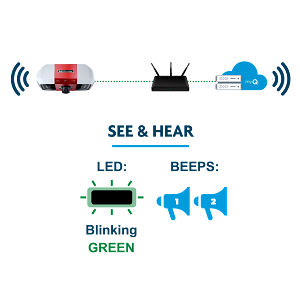
Opener was previously connected? If the opener was working normally and is now offline, power cycle the opener and router first. If it doesn't reconnect, continue with the steps below.
If your garage door opener has built-in Wi-Fi, continue troubleshooting below. If you have a myQ Smart Garage Hub, see Smart Garage Hub or Smart Garage Control | Offline in myQ App instead.
Before You Begin
🪛 You will need: A ladder.
✅ Wi-Fi requirements: Your home Wi-Fi password, and a strong 2.4GHz signal in the garage (5GHz networks are not supported). See myQ Wi-Fi Network Requirements and Router Settings.
🔎 Check first: If the myQ app shows an error code, see myQ Error Codes and How to Resolve Them before continuing.
Steps to Fix a Blinking Green LED
⏱ ABOUT 4 MINUTES
Step 1: Restart the Opener
- Disconnect and reconnect power to the opener.
- If it has a battery backup, disconnect the AC cord first, then the battery.
- Reconnect the battery first, then the AC cord.
Success: The LED turns solid green, confirming the opener is connected to the myQ server.
If not: continue to Step 2.
Step 2: Restart the Router
- Disconnect and reconnect power to your router.
- Warning: everything on your Wi-Fi network will disconnect briefly, and it can take a few minutes to fully reconnect.
- Once your internet is back, verify other devices on the same network can access the internet.
- Repeat Step 1 for the opener.
Success: The LED turns solid green.
If not: continue to Step 3.
Step 3: Check for a Firewall
What is a firewall, and how do I check if I have one?+
A firewall is hardware or software that monitors and filters network traffic, and can sometimes block the connection myQ devices need to reach the myQ server. Some homes have a dedicated firewall appliance, often a separate box installed between your modem and router (common brands include SonicWALL, Zywall, and pfSense). Many routers also include built-in firewall settings you can check from the router's admin console, usually by typing an address like 192.168.1.1 into a web browser, then looking under a Security or Firewall menu. If you're not sure whether you have one, check with whoever set up your network, or contact your internet provider.
If the LED is still blinking green: continue to Step 4.
Step 4: Check Your Router Settings
See myQ Wi-Fi Network Requirements and Router Settings, and contact your internet provider if needed.
If the LED Changes Color
A blinking green LED may change color as the opener progresses through the connection process. Solid green means the opener is online and should be working normally. If it changes from blinking green and stays stuck on another color, tap that color below to see what it means and what to do next.
Did the LED change?
- Yes, select the new LED color above.
- No, and the firewall and router checks above didn't help, contact your internet provider to confirm your connection is passing traffic on port 8883.


