

myQ Wi-Fi Network Requirements and Router Settings
Learn how to adjust your router settings and fix Wi‑Fi connection problems with your myQ garage door opener or hub.
Control and monitor your garage door from anywhere by connecting a myQ Garage, Smart Garage Hub or Smart Garage Control to the myQ app. This guide walks through confirming your device, connecting it to Wi-Fi, pairing the door sensor, and linking the hub to your garage door opener.
| Smart Garage Hub Black hub, includes an Ethernet port Models: MYQ-G0301, 821LMB | myQ Garage Black hub Models: MYQ-G0201, 821LM | Smart Garage Control White hub, no Ethernet port |
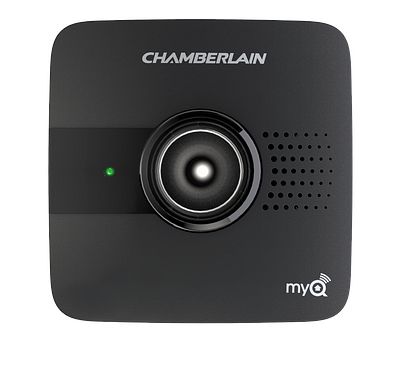 | 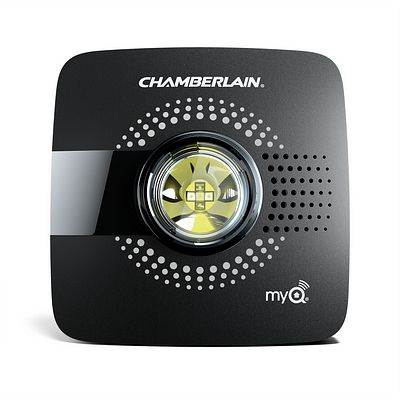 | 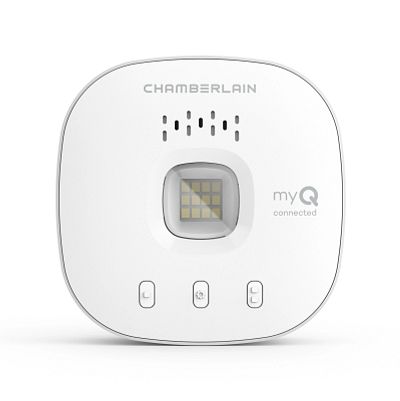 |
➡️If you have a garage door opener with built-in Wi-Fi, do not use this article. Follow: Wi-Fi Garage Door Opener | Wi-Fi Troubleshooting Guide
You will need:
Learn how to adjust your router settings and fix Wi‑Fi connection problems with your myQ garage door opener or hub.
Troubleshooting guide for issues that may occur when connecting a myQ Garage, myQ Smart Garage Hub, or Smart Garage Control to a Wi-Fi network.
This article explains why the myQ app will display "Monitor Door Only" and what you can do to resolve the issue.

Strictly necessary cookies are vital for our website’s core functions, such as security, network management, and accessibility. Since they are essential, these cookies cannot be disabled in our systems.
Third party trackers collect information to use for analytics and to personalize your experience with targeted ads. Under the Colorado CPA, the Virginia CDPA, the Texas DPSA, the Oregon CPA, the Montana CDPA, and the Florida DBR, you have the right to opt-out of the sale of your personal data to third parties, of targeted advertising related processing, and of some types of profiling. You may exercise your rights by using the toggles below. If you opt out, the ads and content that you see may not be as relevant to you. Under the Colorado CPA, you have the right to opt back in to these categories at any time should you initially choose to opt out, and you may do so using the same toggles provided below. For more details on the data we process and how to exercise your rights, and to view information related to required opt-in disclosures, see our Privacy Policy
We and our advertising partners may set these cookies to deliver relevant ads both on our site and across other sites. You can opt-out of these cookies, but you may see less personalized advertising as a result.
These cookies, along with select third-party partners, help us understand how visitors use our site, such as which pages are popular and how long they stay. You can opt-out of these cookies, but your experience may be less customized.
