
Wi-Fi Garage Door Opener | Wi-Fi Troubleshooting Guide
If your myQ Wi‑Fi Garage Door Opener won't connect to Wi-Fi, it can't communicate with the myQ app or myQ server. Check your opener's LED color and beep pattern below, then follow the guide that matches to fix it.
Identify Your Device
The steps below are for a garage door opener with Wi-Fi built in. If you have a separate hub, use the linked article instead.
✅Built-In Wi-Fi Opener
- Wi-Fi logo printed on the opener
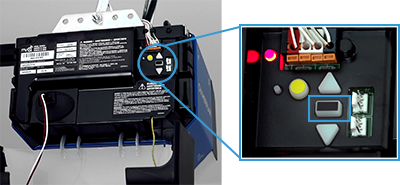
- LED light near the adjustment buttons
❌Smart Garage Control or Hub
- A separate white hub mounted near the opener, not part of the opener itself
See Smart Garage Hub | Device Shows Offline or Unable to Connect to Wi-Fi instead
Find the LED status that matches your opener in the table below, then follow that link for step-by-step troubleshooting.
Use This Article If:
- Your opener won't connect to Wi-Fi and you're not sure why yet.
Do Not Use This Article If:
- This is your first time connecting the opener, see Wi-Fi Garage Door Opener | Setup & Connect to Wi-Fi instead, it includes a full walkthrough and video.
- Your opener was working before and you recently changed your router, Wi-Fi name, or password, see myQ Device Offline After Wi-Fi or Router Change | How to Reconnect instead.
- Your opener connects through a myQ Smart Garage Hub instead of built-in Wi-Fi, see Smart Garage Hub | Device Shows Offline or Unable to Connect to Wi-Fi instead.
Before You Begin
🪛 You will need: A ladder, if the LED is on the opener motor unit
✅ Wi-Fi requirements: Your home Wi-Fi password, and a strong 2.4GHz signal in the garage (5GHz networks are not supported)
📱 Bluetooth: Turned on for your phone. The opener pairs over Bluetooth first, before it connects to Wi-Fi
📍 Phone placement: Move your phone close to the garage door opener before you begin
🔎 Check first: If the myQ app shows an error code, see myQ Error Codes and How to Resolve Them before continuing.
What is a 2.4GHz Wi-Fi signal, and how do I check mine?+
Most home routers broadcast two signals, 2.4GHz and 5GHz. myQ devices only work on 2.4GHz. If your router shows two separate network names, one often ends in "-5G" or similar, connect the opener to the one without "5G" in the name. If you only see one network name, your router may already be combining both bands, check your router's settings page or the label on the router if you're not sure. For router-specific settings, see myQ Wi-Fi Network Requirements and Router Settings.
💡 Tip: During setup, stay connected to your home Wi-Fi. Temporarily turning off mobile data can help prevent connection interruptions.
Locate the LED Indicator Light
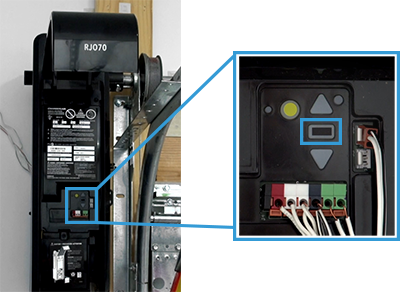
On most openers, the LED is between the up and down arrows near the black adjustment button. On wall-mount openers, it's next to the adjustment controls.
Garage Door Openers
Wall-Mount Openers
Example: Blinking LED
Opener was previously connected? If your opener was working normally and is now offline, try power cycling the opener and router first. If it doesn't reconnect, select the LED status below and follow the troubleshooting steps.
Troubleshoot by LED Light and Beeps
The list below is in order, from no power through fully connected — that order is the opener's setup connection sequence. Whether you're setting up for the first time or reconnecting after it dropped offline, the LED tells you exactly where it got stuck in that process. Tap the light pattern that matches your opener to expand it and see a quick fix — each one links to full troubleshooting if the quick fix doesn't resolve it.
 Unlit LED, no blinking
No beep · No power to the device +
No LED usually means the opener isn't getting power. Confirm power to the unit first, then check the LED again.
Did the LED change?
- Yes, select the new LED color above.
- No, if the light is still off, see No LED Light, Unable to Connect to Wi-Fi for detailed troubleshooting.
 Blinking blue
No beep · Unable to connect to your home Wi-Fi network +
Run the in-app setup process again. If it fails, clear the opener's Wi-Fi settings and try once more.
Did the LED change?
- Yes, select the new LED color above.
- No, if the light is still blinking blue, see Blinking Blue LED, Unable to Connect to Wi-Fi for detailed troubleshooting.
 Solid blue
No beep · Unable to connect to your mobile device +
A solid blue LED usually means an incorrect Wi-Fi password was entered, or a phone setting interrupted the connection. Adjust your phone's settings, then retry setup.
Did the LED change?
- Yes, select the new LED color above.
- No, if the light is still solid blue, see Solid Blue LED, Unable to Connect to Wi-Fi for detailed troubleshooting, including a manual setup method if the app keeps failing.
 Blinking blue and green
One (1) beep · Unable to connect to your home Wi-Fi router +
Check your home internet connection for an outage, then restart your router.
Did the LED change?
- Yes, select the new LED color above.
- No, if the light is still blinking blue and green, see Blinking Blue and Green LED, Unable to Connect to Wi-Fi for detailed troubleshooting.
 Blinking green
Two (2) beeps · Unable to connect to the myQ server +
Power cycle the opener, then the router. If that doesn't work, check for a firewall or router setting blocking the connection.
Did the LED change?
- Yes, select the new LED color above.
- No, if the light is still blinking green, see Blinking Green LED, Unable to Connect to Wi-Fi for detailed troubleshooting.
 Solid green
Three (3) long beeps · Connected to the myQ server, but not yet added to your account +
Check your myQ account for the opener first. If it does not appear in the app, manually add its serial number.
Still not showing up?
- See Solid Green LED, Unable to Connect to Wi-Fi for detailed troubleshooting, including the manual add-device steps and a factory reset option.
Tips to Improve Wi-Fi Signal Strength in Your Garage
A weak Wi-Fi signal is one of the most common causes of connection issues. A few things that help:
- Move your router closer, or reduce the distance between the router and the garage.
- Use a Wi-Fi extender or mesh node to strengthen coverage.
- Avoid thick walls, metal objects, and large appliances near the router.
- Use the 2.4GHz band. It's required for myQ devices.
- Restart your router. A simple reboot can clear temporary network issues.
- Test with a mobile hotspot. If the opener connects to a hotspot but not your router, your home Wi-Fi coverage is likely weak.
I have a mesh Wi-Fi system, or I can't find two separate networks. What do I do?+
Mesh systems and newer routers often combine 2.4GHz and 5GHz under one network name, and pick a band automatically. myQ devices need to connect to the 2.4GHz band specifically, so if setup can't find your network, open your router or mesh app's settings and temporarily split the bands into two separate names. Common mesh systems include eero, Google Nest WiFi, Orbi, and Xfinity xFi Pods. You can combine them again after the opener connects.
💡 Note: Chamberlain Group Technical Support does not troubleshoot routers. If you need help accessing your router, contact its manufacturer. See myQ Wi-Fi Network Requirements and Router Settings for more help.


