
Chamberlain Remotes & Keypads | Check Compatibility
Find a remote control or wireless keypad that works with your garage door opener. Start by checking the color of the LEARN button on your opener.
Where Is the LEARN Button on My Garage Door Opener?
Not sure which color your LEARN button is? Identify the Color of the LEARN Button on Your Garage Door Opener
How Do I Find a Compatible Remote or Keypad?
- Check the color of your opener's LEARN button.
- Open the section for that color below.
- Choose a remote or keypad from the list.
Success: You see a remote or keypad listed for your LEARN button color.
If not: Your opener may use a model not listed here. Use the Compatibility Tool or check the owner's manual for your opener.
To narrow results quickly, use the Compatibility Tool.
Which Remotes and Keypads Work with My LEARN Button?
Tap your LEARN button color below to see the remotes and keypads that work with it.
To program a remote: see Program a Remote Control, which lists steps for each model.
White LEARN Button
Compatible with all current remotes and keypads below.
CH148 (Amber LED)
Standard Wireless Keypad. Scan the QR code on the back for programming.
CHU48 (Blue LED)
Universal Wireless Keypad. Scan the QR code on the back for programming.
Yellow LEARN Button (2011–2022)
Current products:
Purple LEARN Button (2005–2014)
Current products:
Red/Orange LEARN Button (1997–2005)
Current products:
Green LEARN Button (1994–1997)
Current products:
Older Models
These models are no longer manufactured but are still supported. All accessories listed below should be replaced by the most current universal accessory. For a newer remote, use the Compatibility Tool.
Older Remote Controls
Remote controls that are no longer manufactured but are still supported. Colored labels show which LEARN button colors each remote works with.
TM110
ARQ Universal Remote Control
Works with: Yellow (2011–2022) · Purple (2005–2014) · Red/Orange (1997–2005) · Green (1994–1997)
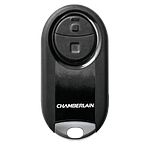
MC100-P2MC
2-Button Mini Universal Remote Control
Works with: Yellow (2011–2022) · Purple (2005–2014) · Red/Orange (1997–2005) · Green (1994–1997)
MC100-P2
2-Button Mini Universal Remote Control
Works with: Yellow (2011–2022) · Purple (2005–2014) · Red/Orange (1997–2005) · Green (1994–1997)
MC100MC
Universal Mini Garage Door Opener Remote Control
Works with: Yellow (2011–2022) · Purple (2005–2014) · Red/Orange (1997–2005) · Green (1994–1997)
Owner's Manual Programming Instructions View Programming Video
MC100
Universal Mini Garage Door Opener Remote Control
Works with: Yellow (2011–2022) · Purple (2005–2014) · Red/Orange (1997–2005) · Green (1994–1997)
Owner's Manual Programming Instructions View Programming Video

KLIK3U / KLIK5U
Universal Garage Door Opener Remote Control. Includes KLIK3U-BK2, KLIK3U-BL2, KLIK3U-SS, KLIK5U-BK2, KLIK5U-SS.
Works with: Yellow (2011–2022) · Purple (2005–2014) · Red/Orange (1997–2005) · Green (1994–1997)
KLIK5U Programming Instructions Owner's Manual Programming Instructions View Programming Video

KLIK5U
Universal Garage Door Opener Remote Control Featuring Realtree Edge
Works with: Yellow (2011–2022) · Purple (2005–2014) · Red/Orange (1997–2005) · Green (1994–1997)
Owner's Manual Programming Instructions View Programming Video
KLIK1U
Universal Garage Door Opener Remote Control
Works with: Yellow (2011–2022) · Purple (2005–2014) · Red/Orange (1997–2005) · Green (1994–1997)

956EV-P2
3-Button Keychain Remote Control
Works with: Yellow (2011–2022) · Purple (2005–2014) · Red/Orange (1997–2005) · Green (1994–1997)
956EV
3-Button Keychain Remote Control
Works with: Yellow (2011–2022) · Purple (2005–2014) · Red/Orange (1997–2005) · Green (1994–1997)

953EV-P2MC
3-Button Visor Remote Control
Works with: Yellow (2011–2022) · Purple (2005–2014) · Red/Orange (1997–2005) · Green (1994–1997)
953EV
3-Button Remote Control
Works with: Yellow (2011–2022) · Purple (2005–2014) · Red/Orange (1997–2005) · Green (1994–1997)
950EV
Single Button Security+ Remote Control. Previous model number: 950ESTD.
Works with: Yellow (2011–2022) · Purple (2005–2014) · Red/Orange (1997–2005) · Green (1994–1997)
953ESTD
3-Button Remote Control
Works with: Yellow (2011–2022)
953D
3-Button Security+ Remote Control
Works with: Purple (2005–2014)
953CB
3-Button Security+ Remote Control
Works with: Red/Orange (1997–2005)
950CB
Single Button Security+ Remote Control
Works with: Red/Orange (1997–2005)
853CB
Multi-Function Remote Control
Works with: Green (1994–1997)
850CB
Single Function Remote Control
Works with: Green (1994–1997)
CLT1D
2-Button Universal Garage Door Opener Remote Control
Works with: Purple (2005–2014) · Red/Orange (1997–2005) · Green (1994–1997)
CLT1C
2-Button Universal Garage Door Opener Remote Control
Works with: Red/Orange (1997–2005) · Green (1994–1997)
CLT1B
2-Button Universal Garage Door Opener Remote Control
Works with: Red/Orange (1997–2005) · Green (1994–1997)
CLT1
2-Button Universal Garage Door Opener Remote Control
Works with: Red/Orange (1997–2005) · Green (1994–1997)
Older Keypads
Wireless keypads that are no longer manufactured but are still supported. Colored labels show which LEARN button colors each keypad works with.

940EV-P2MC
Wireless Keypad
Works with: Yellow (2011–2022) · Purple (2005–2014) · Red/Orange (1997–2005) · Green (1994–1997)
940EV-P2
Wireless Keyless Entry
Works with: Yellow (2011–2022) · Purple (2005–2014) · Red/Orange (1997–2005) · Green (1994–1997)
Owner's Manual Programming Instructions View Programming Video
940EV
Wireless Keyless Entry
Works with: Yellow (2011–2022) · Purple (2005–2014) · Red/Orange (1997–2005) · Green (1994–1997)
Owner's Manual Programming Instructions View Programming Video
940ESTD
Wireless Keyless Entry
Works with: Yellow (2011–2022)
940CB
Wireless Keyless Entry
Works with: Red/Orange (1997–2005)
740CB
Wireless Keyless Entry
Works with: Green (1994–1997)

KLIK2U-P2
Universal Wireless Keypad
Works with: Yellow (2011–2022) · Purple (2005–2014) · Red/Orange (1997–2005) · Green (1994–1997)
KLIK2U
Universal Wireless Keypad
Works with: Yellow (2011–2022) · Purple (2005–2014) · Red/Orange (1997–2005) · Green (1994–1997)
Owner's Manual Programming Instructions View Programming Video
CLK1D
Wireless Keyless Entry
Works with: Purple (2005–2014) · Red/Orange (1997–2005) · Green (1994–1997)
CLK1
Wireless Keyless Entry
Works with: Red/Orange (1997–2005) · Green (1994–1997)
Competitor Brand Remotes and Keypads
A competitor brand is a garage door opener that is not made by Chamberlain. These Chamberlain universal models work with competitor garage door openers. Check the owner's manual to confirm compatibility with your opener.
CHU48 (Blue LED)
Universal Wireless Keypad. Scan the QR code on the back for programming.
To program a universal model to a competitor opener, follow the programming steps in the owner's manual for that garage door opener. Chamberlain cannot provide programming steps for competitor openers.
Related Articles
- How to Find the Learn Button on My Garage Door Opener
- Functions of the Learn/Program Button on a Garage Door Opener
Still Need Help?
If your remote or keypad still doesn't work after programming, contact Residential Support.


