Loading

878MAX Programming Guide

Programming Guide for LiftMaster Wireless Keyless Entry System

Instructions for Programming a LiftMaster 878MAX Wireless Keypad

The 878MAX keypad is pre-programmed to work with a LiftMaster garage door opener with a yellow LEARN button. Locate the LEARN button on your garage door opener - the color of the button will determine the method of programming.
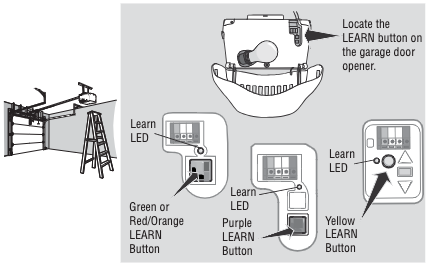

Select the LEARN button type on your garage door opener to continue


Method A - Yellow LEARN Button

  1. Press and release the LEARN button on the garage door opener. The LED will light up.
  2. Enter a 4-digit PIN of your choice.
  3. Press the ENTER button on the keypad until the opener light bulb blinks or you hear two clicks.
  4. Test by keying in the PIN you just programmed and pressing the ENTER button.

Method B - Other LEARN Button

  1. Press and hold the * and # buttons on the keypad until the keypad lights stop blinking.
  2. Enter a 4-digit PIN of your choice then press the # button.
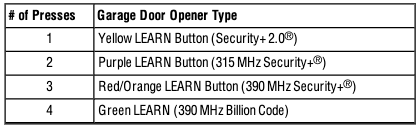
  3. Press and release the ENTER button on the keypad the number of times that corresponds with your garage door opener unit:
  4. Then press and release the 0 (zero) button.
  5. Press and release the LEARN button one time on the garage door opener. The LEARN button will light up.
  6. Enter the 4-digit PIN from Step 2, then press and release the ENTER button on the keypad until the garage door opener lights flash of you hear two clicks.
  7. Test by keying in the PIN you just programmed and then press the ENTER button.
Change an Existing PIN

  1. Enter the programmed PIN you want to change.
  2. Press and hold the # button on the keypad until the garage door opener light blinks twice.
  3. Enter the new 4-digit PIN of your choice and press the ENTER button. The opener light will blink once.
  4. Test by entering the PIN you just programmed, and then press the ENTER button. The garage door opener will activate.


*You cannot change an existing PIN for an opener with a green LEARN button or an external receiver. You MUST repeat "Program the Initial PIN" to change the PIN


Program a Temporary PIN

NOTE: This feature is not available on garage door openers that have a green LEARN button or an external receiver.


A temporary 4-digit PIN can be programmed to let visitors inside your garage. For each PIN you program, you can set up one (1) temporary PIN. The temporary PIN can be set for a number of hours or a specific number of openings. The temporary PIN cannot be the same as any previously programmed PIN.


  1. Press any programmed PIN, then press and hold the * button until the garage door opener light blinks three times.
  2. Press the temporary 4-digit PIN of your choice, then press the ENTER button. The light blinks 4 times.
  3. Enter the temporary PIN limit of use by:
    1. Number of Hours the PIN Will Work
      1. Press the number that corresponds with how many hours you want the PIN to work (up to 255) and then press the * button. The opener light should blink once.
    2. Number of Openings the PIN Will Work
      1. Press the number that corresponds with how many times you want the PIN to open the garage door (up to 255) and then press the # button. The opener light should blink once.
  4. Test by keying in the temporary PIN you just programmed, and then press the ENTER button. The garage door should activate.


To clear the temporary PIN, repeat steps 1-4. When you reach step 3, set the number of hours/openings to 0.

Back to Top
Find Help By Product
View More Brands

Need a Hand? We’ve Got You!

Chat with Amber, our AI assistant, for instant support - available 24/7

More Ways to Connect
Residential Support

For homeowners, please contact us here.

Residential Gate Support

For homeowners with gates, please reach out to your local dealer.

Commercial Support

For Partners, Technicians or Installers, contact us here.

Loading
Programming Guide for LiftMaster Wireless Keypad | Chamberlain Group
